
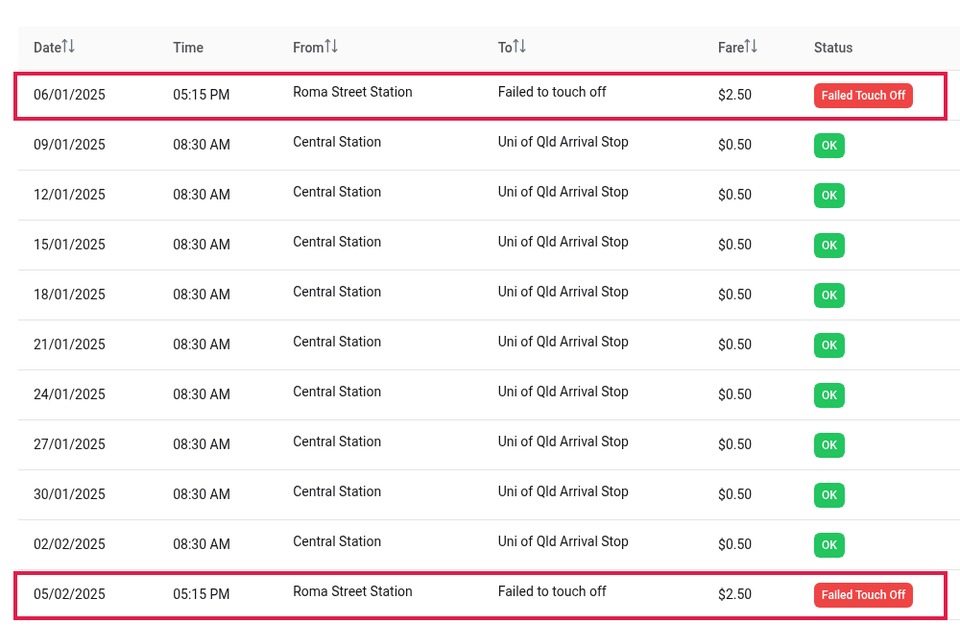
Fifty cents to get from West End into the city is one of the better deals in Brisbane. Since the flat fare came in, it’s 50c on the 199, the Blue CityGlider, the CityCat from the West End terminal or a train out of South Brisbane, however far you go.
But a trip doesn’t always cost 50c. If the system can’t match where you tapped on with where you tapped off, Translink charges a default fare of $2.50 instead. That’s five times the normal fare, and most of us never notice it because we never open our trip history.
Here’s how to check yours in a couple of minutes, and what you can do about it.
Why a 50c trip becomes $2.50
Translink’s default fare is $2.50 on buses, trains, trams and ferries, and it’s the same for adults, kids, seniors and concession card holders. You get it when a trip has a tap on with no matching tap off, or the other way round.
Sometimes that’s on us. We jump off a crowded 199 at Boundary Street and forget to tap. Sometimes it isn’t. A validator shows a red cross and the doors close before we can try again, a reader is out of order, or a service is cancelled and we give up on the trip.
One mix-up can cost double. If you tap on with one card and tap off with a different one, Translink’s system sees two half-finished trips. Card A has a tap on with no tap off, card B has a tap off with no tap on, and each gets a $2.50 default fare. A 50c trip ends up costing $5.00. It’s easy to do if you carry more than one go card, or when a family’s cards live in the same wallet or bag and you grab the wrong one at the end of the trip. Check which card you’re holding before you tap off.
That difference matters, because Translink only adjusts some of these. Its go card user guide says default fares “applied due to customer error are non-refundable”. The cases it does consider include validators that weren’t working, an evacuation or incident, a trip abandoned because a service was late or cancelled, and a fare the system got wrong.
Step 1: Open your go card history
- Log in to your go card account at gocard.translink.com.au. If your card isn’t registered, register it first. It takes a few minutes and also protects your balance if you lose the card.
- Open the History tab.
- Scan down the fare column for anything that isn’t 50c. A $2.50 charge, or a trip with no tap off, is a default fare.
If you’d rather not scroll through months of trips, you can download your history as a file and let a free tool flag them for you (more on that below).
Step 2: Ask yourself what happened
For each $2.50 trip, think back. Did you forget to tap off? Then it won’t qualify, and it’s worth a mental note for next time.
Was the reader on the bus not working? Did you tap and get a red cross? Was your CityCat cancelled so you got off and walked? Those are the ones to report.
Step 3: Request a balance adjustment
Translink calls the fix a balance adjustment, and you have 120 days from the date of the error to ask.
- In your go card History, click Report next to the trip.
- Check the date and time, and add a short comment.
- Click Submit fare enquiry.
You can also call 13 12 30. Translink says it usually processes these within 48 hours, and the credit goes back on your go card the next time you tap on.
Keep the comment specific. For example: “Tapped on at West End on the 199 at 8:05 am. The reader showed a red cross when I tapped off at Adelaide Street and the bus pulled away.”
Tapping your phone or bank card instead?
Contactless trips don’t show up in a go card account. Check them in the Translink Ticketing Assistant (ticketingassistant.translink.com.au), using your physical card’s number, expiry and CVV even if you tap with your phone.
One common trap: Apple Pay and Google Pay give your card a different number on each device. Tap on with your phone and off with the plastic card, and Translink sees two different cards and charges a default fare. Pick one and use it for every tap.
Is it worth the bother?
Honestly, the amounts are small. Each default fare is $2 more than you should have paid. But if you commute every weekday, a dodgy reader on your regular bus can catch you more than once, and families tapping several cards can rack up a few of these without anyone noticing. Checking takes two minutes.
A free way to check months at once
I volunteer on FareClaim, a free tool built by a few Brisbane locals. You download your go card history and drop the file in, and it flags the trips charged a default fare. The file is read in your browser and never uploaded, there are no ads, and it doesn’t take a cut. It also doesn’t lodge anything for you: it lists the trips so you can decide which ones to report to Translink.
You can try it at fareclaim.app (https://fareclaim.app/?utm_source=westender&utm_medium=guest_post&utm_campaign=go-card-default-fare). There’s a step-by-step guide to downloading your history at fareclaim.app/download-history (https://fareclaim.app/download-history?utm_source=westender&utm_medium=guest_post&utm_campaign=go-card-default-fare).
Jason Tan is a Brisbane commuter and a volunteer at FareClaim, which isn’t affiliated with Translink. Fare details are from Translink’s website and go card user guide, checked October 2026.